Back to blog
Top 10 IT Issues That Can Be Fully Automated Today (But Aren’t)
In
IT Service & Support
by
Divya CH

Most IT teams are not struggling because the problems are complex.
They’re struggling because the same simple problems keep coming back.
Every week, the same tickets show up.
The same fixes are applied.
The same time is spent.
And everyone knows it.
Ask any support engineer what they deal with most often, and you won’t hear about rare edge cases. You’ll hear about the same handful of issues, repeated at scale.
The surprising part is not that these issues exist.
It’s that many of them are still being handled manually.
The Pattern Everyone Recognizes
There’s a category of issues that share three characteristics:
They occur frequently
The root cause is well understood
The resolution steps are predictable
In other words, they are ideal candidates for automation.
And yet, in most environments, they still generate tickets.
1. Disk Space Cleanup
Temporary files. Cache buildup. Log accumulation.
Devices slow down over time, and eventually someone runs out of space.
The fix is almost always the same. Clean up unnecessary files, free space, move on.
Still, it ends up as a ticket.
2. Slow System Performance
Gradual degradation is one of the most common complaints.
Background processes pile up. Startup items grow. Resource usage becomes inefficient.
Users notice it. IT investigates. A set of known optimizations is applied.
Then it happens again.
3. Application Crashes
Certain applications fail in predictable ways.
Restart the service. Clear a cache. Reset a configuration.
These fixes are often documented internally.
But they still depend on someone stepping in each time.
4. VPN Connectivity Issues
Intermittent VPN failures are a constant in distributed environments.
Configuration drift. Expired sessions. Network conflicts.
The resolution usually involves resetting or reinitializing components.
Yet it remains a high-volume support issue.
5. Printer Problems
Few things generate as many small but frequent tickets.
Queue stuck. Driver issues. Connectivity glitches.
The fixes are repetitive and well known.
Still handled manually.
6. Patch Failures
Patches don’t always install cleanly.
Retries, dependency issues, temporary conflicts.
In many cases, a structured retry or cleanup resolves the problem.
But it often requires intervention.
7. High CPU or Memory Spikes
Transient spikes caused by specific processes or behaviors.
Restarting a service. Killing a runaway process. Adjusting usage.
These are not unknown problems.
They’re recurring patterns.
8. Network Instability
Fluctuating connections, especially in remote setups.
Resetting adapters. Renewing configurations. Re-establishing connections.
These steps are almost always the same.
9. Startup Slowdowns
Over time, devices accumulate startup programs.
Boot times increase. Systems feel sluggish from the start.
The fix is straightforward. Optimize startup behavior.
Yet it rarely happens proactively.
10. Configuration Drift
Small changes over time create inconsistencies.
Settings deviate from baseline. Performance and stability are affected.
Reapplying known-good configurations resolves many of these issues.
But only after symptoms appear.
Why These Still Aren’t Automated
t’s not because they’re hard to automate.
It’s because of how most systems are designed.
Tools focus on detection, not resolution
Automation is treated as an add-on, not a core capability
Environments are too dynamic for static rules to hold up
There’s hesitation around autonomous actions
So teams continue to rely on human intervention, even when the solution is known.
The Cost of Repetition
Every time a known issue is handled manually, three things happen:
Time is spent on work that could have been eliminated
Attention is diverted from higher-value tasks
The system fails to improve itself
Over time, this creates a ceiling on efficiency.
Not because the team isn’t capable, but because the model doesn’t evolve.
Where Nanoheal Fits In
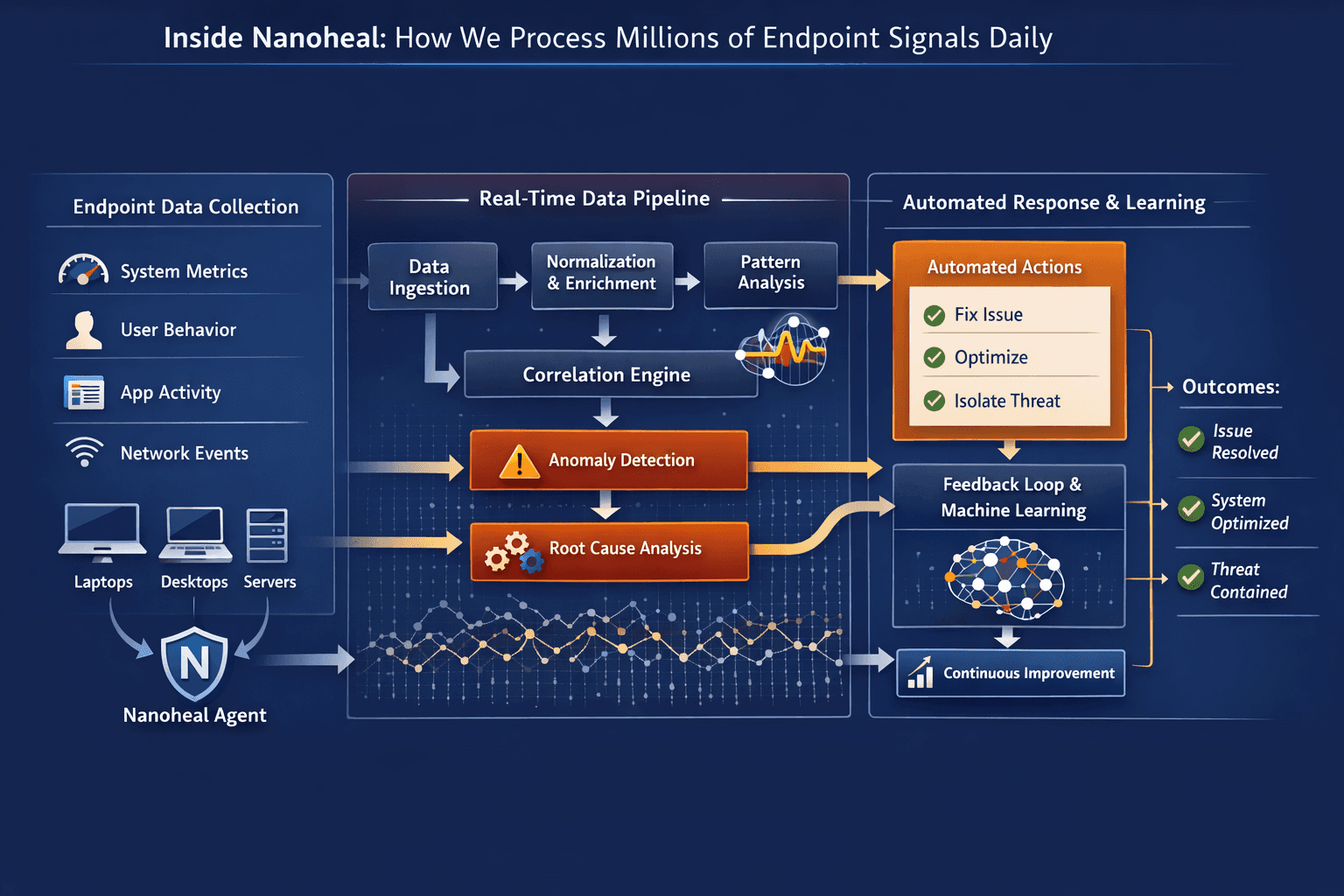
Nanoheal is designed to eliminate this category of work.
Instead of treating these as tickets, it treats them as patterns.
Recognizing recurring issues across endpoints
Understanding the typical resolution paths
Automatically triggering corrective actions
Learning from each instance to refine future responses
This turns repetitive support into continuous self-correction.
The result is not just faster resolution.
It’s fewer problems needing resolution at all.
A Simple Exercise
Look at your last 100 tickets.
How many fall into these categories?
Now ask:
How many of these should still exist?
That answer usually says more about the system than the team.
Final Thought
Automation in IT is often discussed in abstract terms.
AI. AIOps. Transformation.
But the real opportunity is much simpler.
Stop doing the same work over and over again.
The tools to fix this already exist.
The question is whether the system is designed to use them.