

Orchestrate the IT Ecosystem
One fix can reach the laptop, the directory and the ticket.
Most fixes don’t end on the laptop, and connecting each system is usually a project of its own. Connect your service desk, directory and chat tools once. After that, a fix can finish in any of them, under the same approvals as an action on the laptop.
One event, four systems
Connected once, per site
Ticket events in, directory actions out, and any system with a standard API, described rather than built.
Event 20227
VPN connection failed · LT‑2207

-
Ticket events
Your ITSM → NanohealTaking in inbound ticket events from your ITSM, to show what to fix next and which calls stopped.
✓ticket closed with the record
-
API and catalogue
Your tools → NanohealAccess through a REST API with site-scoped API keys, read or write.
✓licence reclaimed
-
Connectors
Nanoheal → your toolsPer-site connections to ServiceNow, BMC Helix, Autotask, Microsoft Teams and Slack.
✓entry corrected
-
Event subscriptions
Nanoheal → any URLDevice and fix events, through webhooks and event subscriptions to any URL.
✓team notified
A connector per site, not a project per system.
Connections are scoped to a site, so one console can hold a regional desk, a division’s own instance and a client’s PSA without choosing between them.
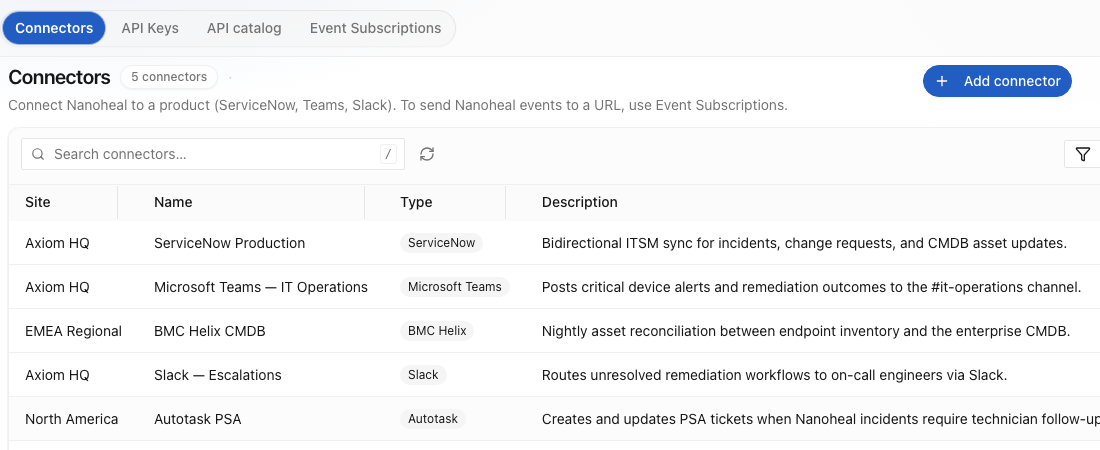
Connectors5 connectors, each held for one site
| Site | Connector |
|---|---|
| Axiom HQ | ServiceNow Production |
| Axiom HQ | Microsoft Teams — IT Operations |
| EMEA Regional | BMC Helix CMDB |
| Axiom HQ | Slack — Escalations |
| North America | Autotask PSA |
Actions in other systems run through outbound integrations, with APIs and MCP servers as no-code building blocks. Ask us which are live for your stack
The directory, the service desk and Teams finish the job.
A forgotten password or a new starter needs more than the laptop: a password to reset, a ticket to close, a person to tell.
Swipe to see the whole run →
Service desk.
Ticket history gives the problem its context, and the ticket is updated when the fix completes, by the platform rather than a person. Assisted IT, where the desk runs the approved fix, starts straight from the ticket.
Directory.
Password resets on the device, through Active Directory and Entra ID.
Teams and channels.
Notify the right people when a fix needs a human, through Microsoft Teams and Slack. The device details go with the message, so whoever picks it up starts with the facts.
Acting in a directory is higher stakes than acting on a laptop.
- Credentials
- Held per site, with secrets never returned to the console.
- Keys
- Scoped to a site and to read or write. Only a hash of each key is stored.
- Access
- Who configures a connection, and who runs what through it, is set with role-based access and MFA.
- Ticket events1,912 events this week Receiving
ITSM → Nanoheal
- REST API3 keys · 2 read, 1 write Active
Your tools → Nanoheal
- ConnectorNotify when a fix needs a person Active
Nanoheal → collaboration
- Event subscriptionfix.completed · fix.failed Paused
Nanoheal → any URL
Configuration changes land in the same audit log as every fix. Trust & security.
A fix is done when the laptop works, the ticket is closed and the person knows.