

Contact centres & BPO
Every agent ready when the shift starts.
An agent who can’t hear the caller, or whose VPN just dropped, isn’t taking calls. Nanoheal watches each agent’s desktop and call quality, and fixes audio, VPN and frozen apps on the device.
Fixed on the device, then checked.
From the fault on one device to the pattern across every site. Each fix is already in the automation library: it runs when the device reports the problem, checks the result, and hands the case to IT, with the evidence, only if it didn’t hold.
-
Across the floor
Calls start breaking up for one site’s agents.
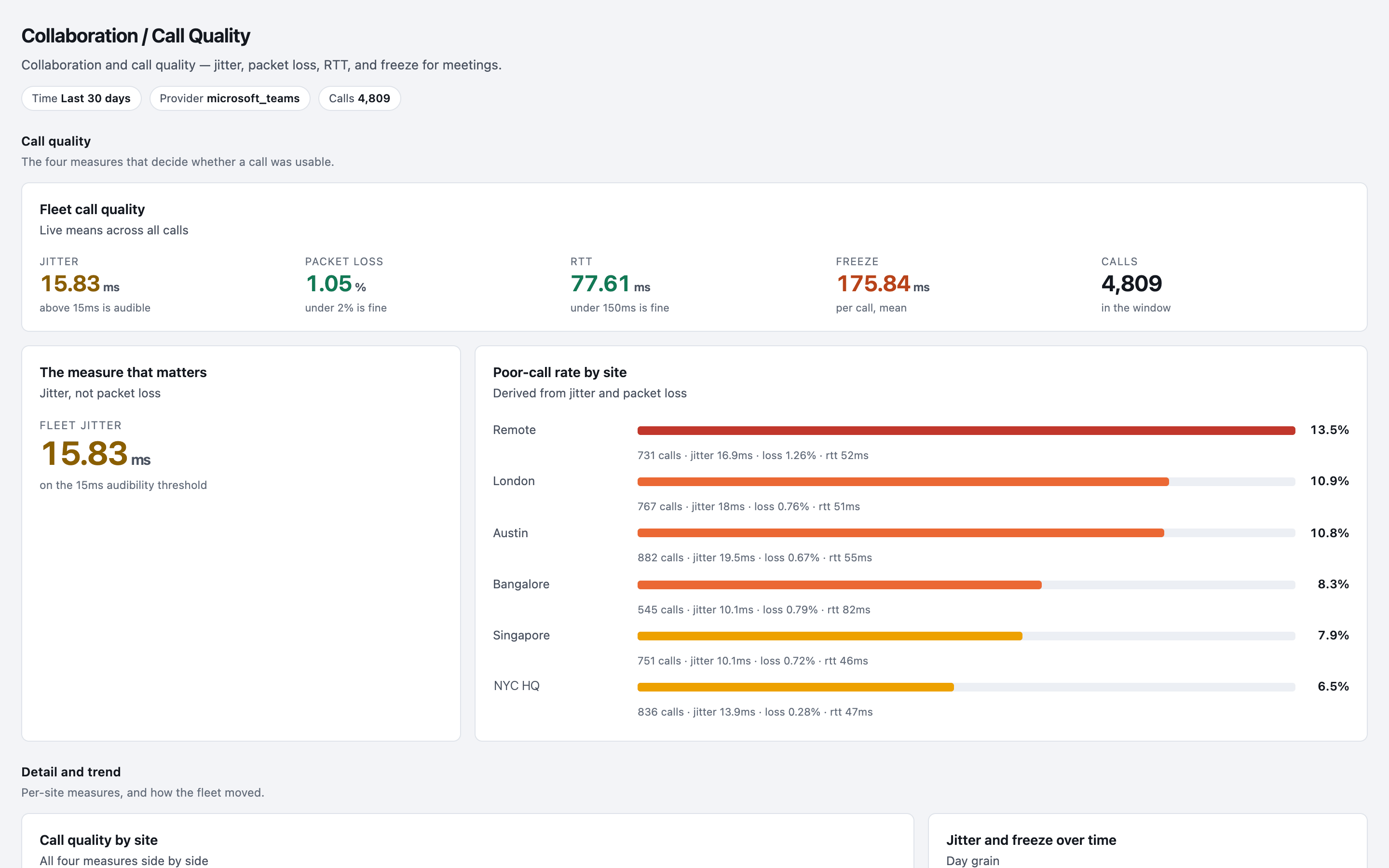
- Call quality is measured on every desk. Haya ranks sites by poor-call rate and shows jitter climbing at one site, not on one desk.
- The desktops there are healthy, so the network team gets the evidence instead of a pile of tickets.
- Desks where an audio driver broke get it rolled back, and checked.
The right team fixes the right thing first.
-
Before the shift
A headset vanished after last night’s update.
- The agent’s audio device disappears after a driver update overnight.
- The driver is rolled back for that headset model, and Teams is restarted.
- The agent checks Teams sees the headset; if it doesn’t, IT gets the case with the evidence.
On calls when the shift starts.
-
New agents
Thirty new agents start next week.
- An onboarding sequence installs and sets up the softphone, the CRM, the headset driver and Teams.
- Seats left by agents who have gone are taken back first: licence harvesting for Microsoft 365, Adobe and Zoom.
- Forgotten passwords on day one: password resets on the device, through Active Directory and Entra ID.
Day one is training, not tickets.
And the everyday fixes
Hear what the caller hears, desk by desk.
Nanoheal measures call quality for Microsoft Teams and Slack on every agent’s desk, and Haya, Nanoheal’s AI and analytics, ranks sites by poor-call rate, so you know which floor or which homes to fix first. A BPO runs every client apart: Nanoheal is multi-tenant, with per-tenant branding and licence pools, with data scoped to each site, with requests for another site refused.
What it’s worth
- More agents on callsFewer minutes lost to audio and VPN.
- Calls that sound rightCall quality on every desk.
- A faster first dayNew agents set up in one run.
- Fewer tickets from the floorFixed before the team lead raises one.
Free automation assessment
Send us your floor’s top call drivers.
We map them against the library and email you a report: what resolves out of the box, what to build, and where to start. No call needed.
The same library, the same agent and the same approvals, set up for how your sites work.