

Employee self-service
Self-service fails when it asks the employee to diagnose.
A search box works only for people who already know what is wrong and can say it in IT’s words. The device recorded the problem before anyone typed, so we offer the matching fix in place.

Outlook keeps closing. Repairing your mail profile takes about a minute, and your mail stays where it is.
Outlook opens · checked after the fix
Six steps, or one
What normally happens
Every step loses someone. The last step is a phone call.
- 01 notices something is wrong
- 02 decides it is IT’s problem
- 03 finds the portal
- 04 guesses the right words
- 05 reads a technician’s article
- 06 gives up or calls
A portal hands the diagnosis to the person with the least context: is the slowness a fault, is it IT’s fault, which words does the knowledge base use for it, and which lines of a technician’s article apply to this machine. Most people drop out along the way and ring the desk.
What Nanoheal does
The offer arrives with the symptom.
- 01 the fix is offered on the device
nothing further is asked
The agent already knows the VPN client has stalled, so the employee sees one specific action, offered on the device when the failure happens. Nothing to describe, search for or read: the entry that could have run silently is offered for a click instead.
The employee gets the same fix the desk already runs.
Portal self-service carries a content debt that never clears: each new fault needs an article, each article needs an owner, and every OS release breaks a few. Here the offer is the tested fix itself, the one Autoheal and the desk already run.
Authored once in the visual automation builder and marked On demand, it reaches the employee through Self Help and the technician through remote execution (Assisted IT). Coverage starts from the 1,200+ fixes in the automation library and widens as it grows, not as articles get written.
VPN adapter reset
- Autoheal
- On demand
- Assisted IT
- Scheduled
Written once. No article to maintain.
Nanoheal can reset the network adapter. You stay signed in, and it takes a few seconds.
Offered on the device, at the moment it fails. Nothing to search for.
The same entry, on one device or a whole group, when someone calls.
When the employee should be in the loop
Not every fix should run silently. One that closes an application, forces a restart or touches personal files is better offered than imposed, so who acts is a guardrail on the knowledge entry, set per population, without a second automation.
Why: Invisible to the employee and safe at any time.
Why: Unsaved work may be lost, so the person at the keyboard decides.
Why: The employee picks a moment that doesn’t break a meeting.
Deflection that shows up in the experience number.
A self-service run is recorded like any other resolution: the condition before, the action taken and the condition after, and the effect on the experience score for that population. It is counted per automation alongside Autoheal and Assisted IT.
How it’s measured1 click
From the fault to the fix, on the device where it broke.
The employee sees the fix offered, accepts it, and it runs. That covers password resets on the device, through Active Directory and Entra ID, and fixes keep running without a cloud connection, where the policy or automation does not need one.
- Before
- VPN connection stalled · LT-5120, remote
- Action
- Network adapter reset, offered on the device, accepted · 4.2 s
- After
- Connected, checked after the fix
- Score
- Network experience, remote staff 61 → 66
- Counted as
- AutohealSelf-serviceAssisted IT
Sentiment, asked at the right moment
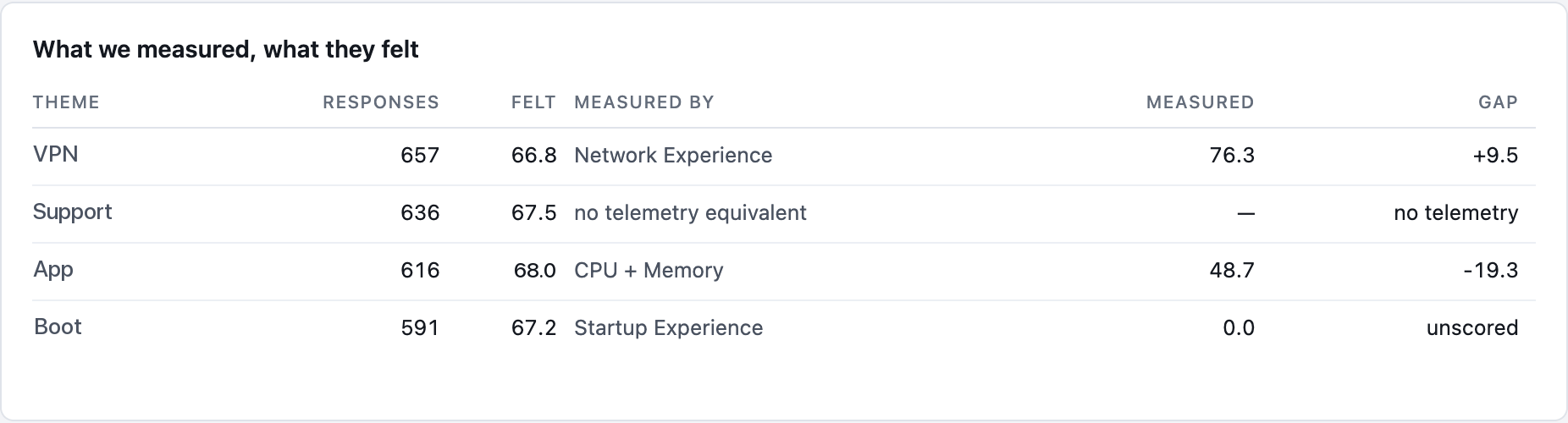
Annual surveys measure a year’s mood. A question asked minutes after a fix measures that fix.
A short survey can run after the fix, so the employee’s verdict is collected while the incident is recent and sits beside the device evidence from the same moment.
The employee shouldn’t have to diagnose the laptop. It already knows what broke.